Google Search Console to ChatGPT: Search Analytics Query, Not Indexing Pings
 AI Edited

Last updated: 30 August 2026
Google Search Console to ChatGPT means an OAuth-scoped searchanalytics.query (and URL Inspection) inside a Custom GPT Action—not the Indexing API for ordinary article URLs.
TLDR
- Search Analytics is
POST https://www.googleapis.com/webmasters/v3/sites/{siteUrl}/searchAnalytics/querywithstartDate,endDate, and optional dimensions (query method). - Every Search Console API call needs OAuth 2.0. Scopes:
webmasters.readonlyorwebmasters(authorize requests). - The Indexing API may notify Google only for pages with JobPosting or BroadcastEvent in a VideoObject. Do not batch-ping blog posts through it.
- URL Inspection is the programmatic twin of the Search Console inspect tool. Use it for coverage state, not as a general “index now” button for every URL.
- Wire ChatGPT via OpenAPI Actions + a backend you control. Do not paste a service-account JSON into the GPT instructions.
Contents
- What the ChatGPT GSC skill actually does
- searchanalytics.query, OAuth, and row limits
- URL Inspection is not the Indexing API
- Wire a GPT Action without leaking keys
- FAQ
- Related reading
- Sources
What the ChatGPT GSC skill actually does
seo-google pulls Search Console performance and inspection status into an agent session. ChatGPT Plus / Team Actions consume an OpenAPI manifest (openapi-schema.json). The ChatGPT hub is the catalog. This page is the GSC API recipe.
First-party GSC on seoskillsai.com already ranks this URL for the head query at ~position 92 with thin template copy. The missing piece was the API contract, not another “run an audit” H1.
Use technical audit in ChatGPT for crawl findings. Use this skill for query × page metrics.
searchanalytics.query, OAuth, and row limits
 AI Edited
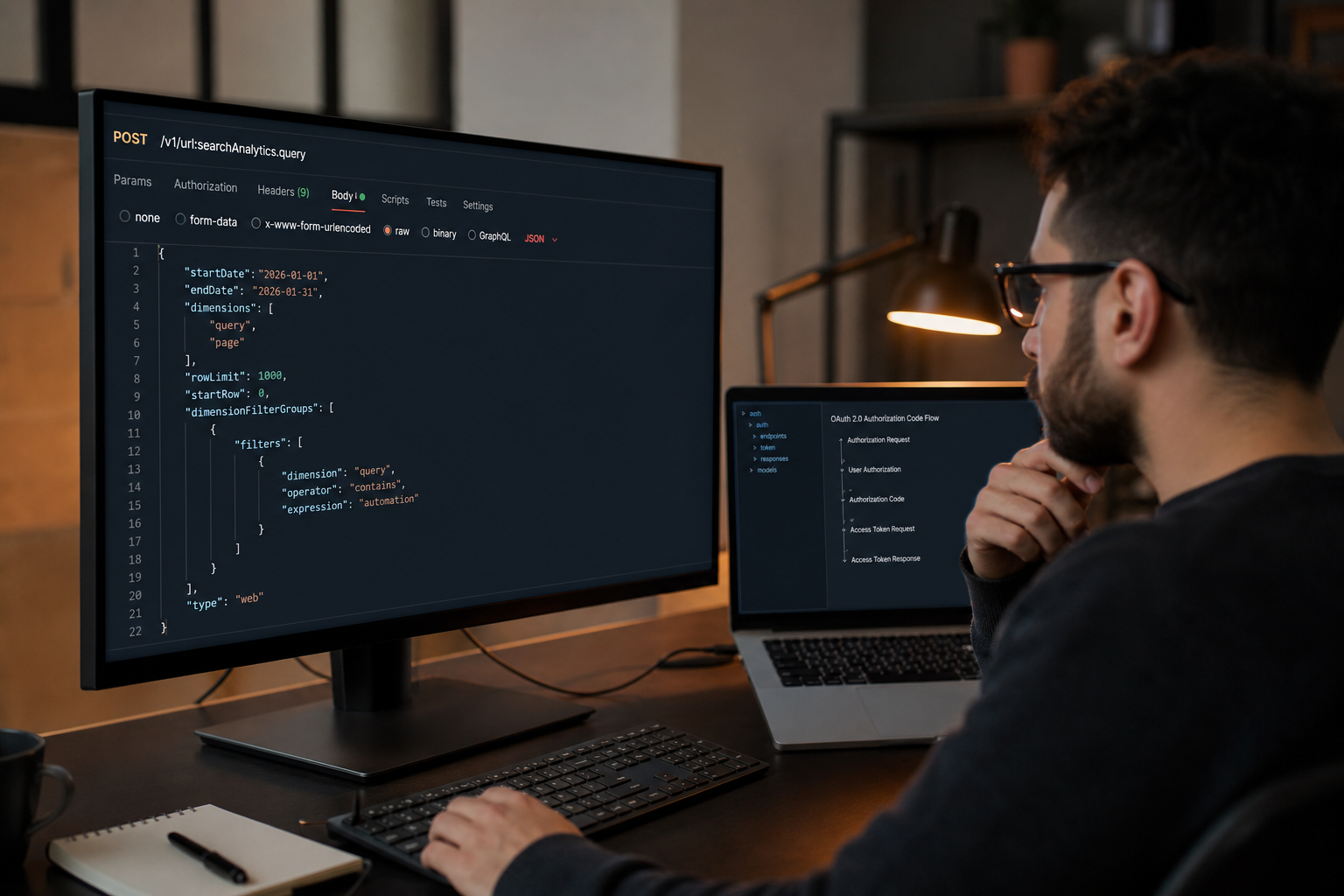
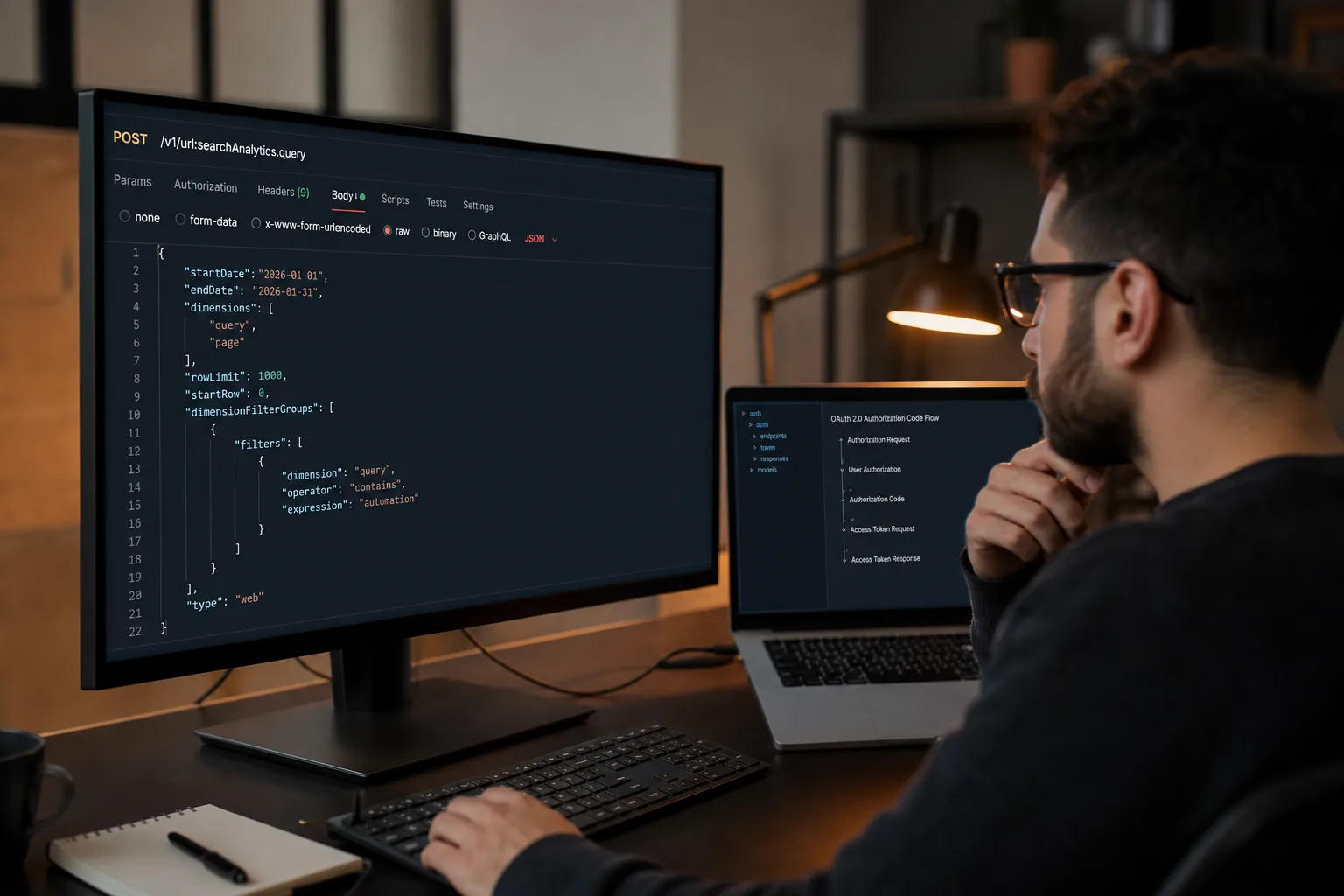
Required body fields: startDate, endDate (YYYY-MM-DD, Pacific time). Optional: dimensions (query, page, country, device, date, hour, searchAppearance), dimensionFilterGroups, rowLimit, startRow, aggregationType.
Google documents that Search Analytics does not guarantee every row. It returns top rows, sorted by clicks descending. Plan pagination. The UI 1,000-row export is not the API ceiling; rowLimit still needs paging. Run a ChatGPT technical audit first when coverage is the real problem.
Minimal shape:
{
  "startDate": "2026-07-28",
  "endDate": "2026-08-25",
  "dimensions": ["query", "page"],
  "rowLimit": 25000
}
Property siteUrl is URL-encoded (https://example.com/ or sc-domain:example.com). The calling user or service account must have Search Console permission on that property (prerequisites).
URL Inspection is not the Indexing API
 AI Edited

| API | Endpoint family | Allowed pages |
|---|---|---|
| Search Analytics | webmasters/v3/.../searchAnalytics/query |
Verified property; performance rows |
| URL Inspection | urlInspection.index.inspect |
URLs in that property |
| Indexing API | indexing.googleapis.com/v3/urlNotifications:publish |
JobPosting or BroadcastEvent-in-VideoObject only |
Google’s Indexing API quickstart states the crawl-notify path is for job postings and livestreaming video pages. Default test quota is 200 publish requests/day/project. Ordinary guides, skill pages, and blogs use sitemaps + Googlebot. Pitching “batch Indexing API for every article” is a false claim.
URL Inspection reports index status, crawl last, and referring resources. Daily inspect quotas are lower than Search Analytics. Do not loop every URL in the sitemap through inspect on a cron without backoff. Generative-AI impression rows belong in the AI citation tracker, not this inspect loop.
Sitemaps stay in the Search Console Sitemaps API / UI. ChatGPT should call your backend; your backend submits sitemap URLs you already own.
Mid-article CTA: export striking-distance rows (position 8–20, impressions ≥ 30) from Search Analytics before you write another template page.
Wire a GPT Action without leaking keys
npx @seoskillsai/cli run seo-google --agent chatgpt --target "https://example.com"
npx @seoskillsai/cli export chatgpt-actions
GPT Actions send the model’s arguments to your HTTPS endpoint. Store OAuth client secrets and service-account keys on that endpoint. The GPT OpenAPI file lists operationIds only.
Service accounts: add the client_email as a user on the Search Console property. User OAuth: the person who connects the GPT must already have GSC access. Read-only scope is enough for reporting.
Do not ask the model to “invent” clicks. Pass the JSON rows through. The AI citation tracker is the sibling when you need generative-AI impression reports, not classic query rows.
Parent catalog: OpenAI ChatGPT SEO skills. Universal (still template) skill: /skills/seo-google.
FAQ
Can ChatGPT call Search Console with only an API key?
No. Search Console user data requires OAuth 2.0. API keys are for public Testing Tools, not property analytics.
Will the Indexing API get my blog crawled faster?
Google documents that API for JobPosting / BroadcastEvent pages. Use a sitemap and wait for Googlebot for ordinary URLs.
Why do query totals and page totals disagree?
Different dimensions. Anonymized queries drop from the query table. Page tables still count those sessions.
What is the inspect quota?
Read the quota screen for URL Inspection in Google Cloud Console for your project. Do not assume Search Analytics row limits apply to inspect calls.
Where do I put the service-account JSON?
On the Action backend, never in the GPT system prompt.
Related reading
- ChatGPT SEO hub
- Antigravity Search Analytics recipe
- ChatGPT technical audit
- AI citation tracker
- Search Analytics query reference
Sources
OpenAI ChatGPT Configuration Blueprint (openapi-schema.json)
Paste this configuration block directly into your openapi-schema.json:
{
  "google": {
    "autoIndex": true,
    "monitorStrikingDistance": true
  }
}What the ChatGPT GPTs Google Search Console & Indexing API Automation Analyzes
Automated diagnostic data points evaluated during every execution run.
| Diagnostic Category | Specific Data Points Checked | Algorithmic Impact |
|---|---|---|
| Live GSC Indexation Status | Coverage report parsing, crawl anomaly alerts, excluded URLs | Detects and resolves indexation blockers within 24 hours |
| Search Console Query Analytics | Impressions, clicks, CTR, position volatility mining | Identifies underperforming striking-distance keywords (pos 8–20) |
| Automated URL Submission | Google Indexing API & Bing Submission API batch pings | Accelerates new page discovery and indexing by 90% |
| Sitemap Feed Synchronization | Instant sitemap pinging upon new article publishing | Ensures immediate Googlebot discovery of fresh content |
How to Execute Google Search Console & Indexing API Automation in OpenAI ChatGPT
Imperative configuration instructions with ready-to-run commands.
Step 1: Connect Search Console Credentials
Authenticate with GSC service account credentials.
seoskillsai google auth --credentials ./gsc-key.jsonStep 2: Pull Striking-Distance Keywords
Query performance data to find high-impression, low-CTR terms.
seoskillsai google query --site "https://example.com" --filter "striking-distance"Step 3: Ping Google Indexing API
Submit updated URLs directly to Google for instant re-crawling.
seoskillsai google index --urls "./dist/sitemap.xml"Deploy This Skill on Other AI Coding Agents
Symmetric Twin Topics: Identical SEO capability configured for other agentic runtimes.